HTML Working
When we want to access any information on the internet we search that on a web browser. The web browser gets all the content from the web servers. This content is stored in the webservers in the form of an HTML document.
An HTML document is first written with some tags in any code editor or your choice of a text editor and then saved with the “ .html ” extension. After this, the browser interprets the HTML document, reads it, and renders a web page.
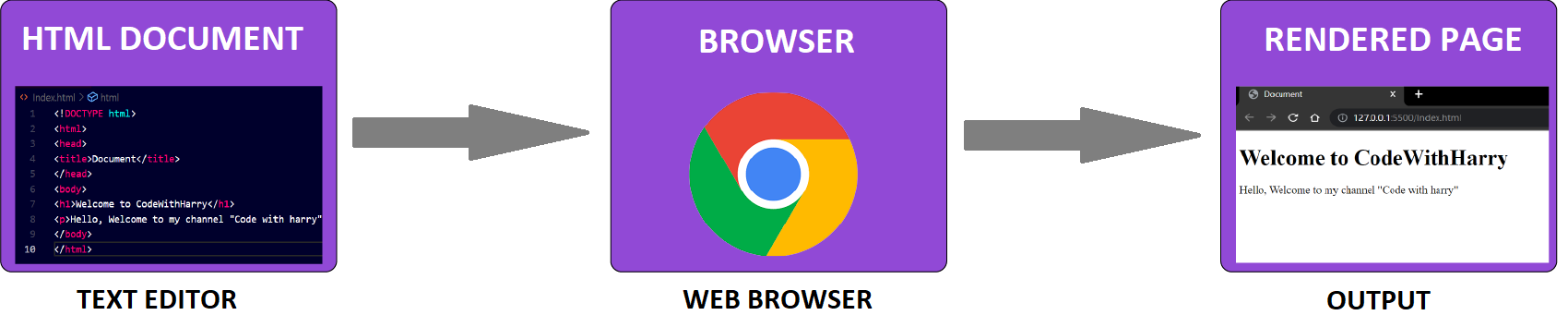
In the above figure, we open a simple text editor, then the basic structure is to be written. Now, this file is to be saved with the "index.html" filename. After saving this file, open this file in your web browser. After opening our webpage will look like as the output.
Below we'll discuss this line briefly.
How does HTML Works?
HTML Document:
HTML Document consists of two parts:
- Creation of Document
- Tags
The first part is Document creation. This is created by choosing any text editor of our choice. The choice depends upon which we want to write our HTML code. Notepad is the easiest way to write but some prefer visual studio, Atom-like code editors to write code. After choosing the editor, the next part is to write tags. Tags contain content and the braces. For example, <body>//content</body>. Don't worry about the syntax you have seen we'll learn about tags in our upcoming tutorial section. So after writing tags we save our document in the editor with the ".html" or ".htm" extension. For example, "helloprogram.html". This .html extension signal browser to read the file. We have finished our work and now it is time for the browser to do its work.
Browser:
- A browser is an application that reads HTML documents and renders the webpage.
- They cannot read the content directly where it is stored. To settle this conflict servers are used.
- A server acts like an intermediate, it patiently listens to the browser's request and executes it.
- Now the document is delivered to the browser.
- Browsers support two parts now: parsing and rendering.
- When the browser is in the parsing stage, it receives raw bytes which are converted into characters and these characters are then converted into tokens after that tokens are converted into nodes. Then these nodes are linked in a tree data structure known as DOM(Document Object Model).
- when the DOM tree structure has been constructed, the browser starts its rendering. Now each node in the DOM tree will be rendered and displayed.
Rendered Page:
This rendered page is the output screen of our HTML Document.
How does the basic website work?
- Web Browser(client) requests www.codewithharry.com like websites from the webserver.
- Webserver in return sends HTML, CSS, and JS files to it.
- HTML, JS, and CSS files are parsed by a web browser and show you a beautiful website.


